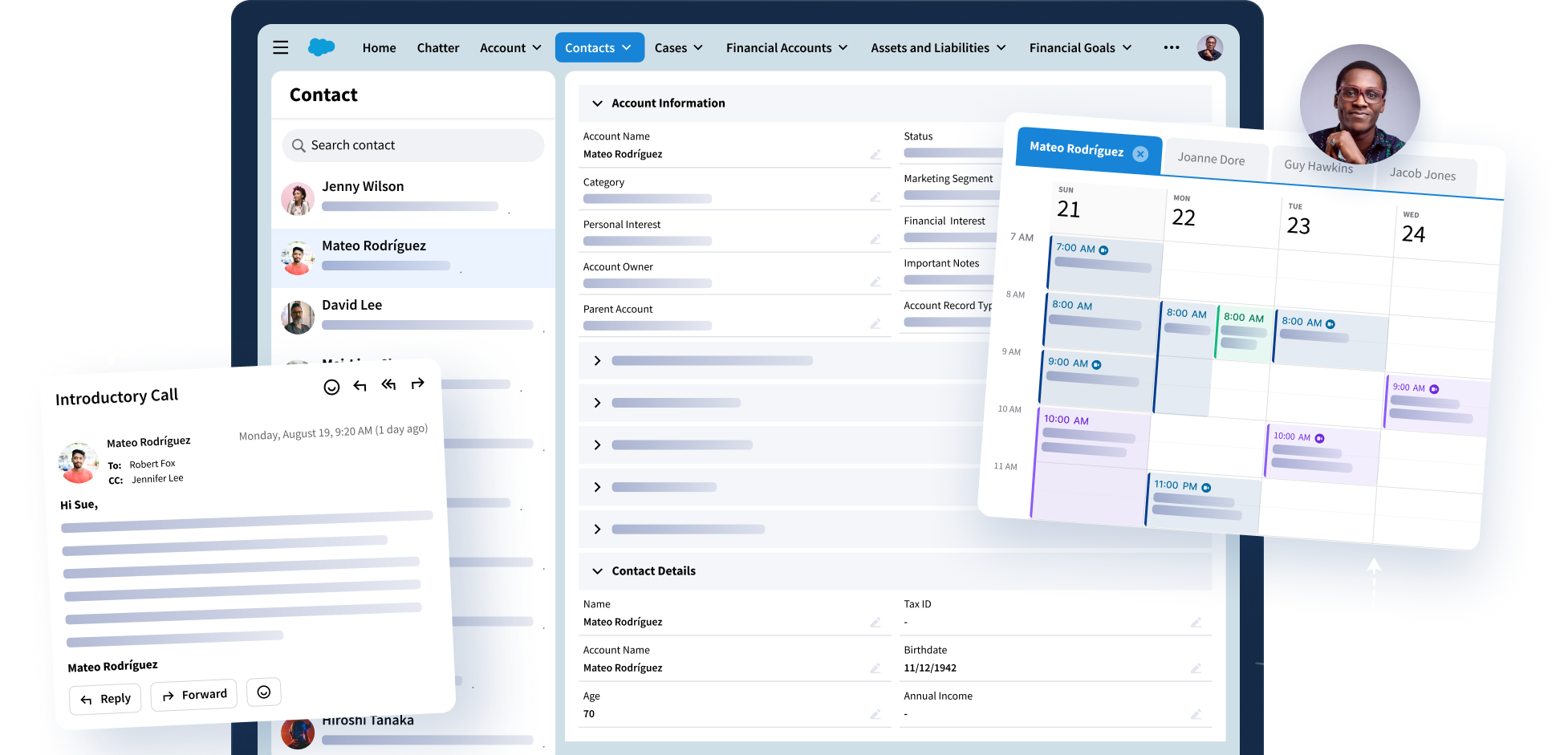


When teams work in Outlook or Gmail but customer data lives in Salesforce, important activity is easy to lose. Emails are sent, meetings happen, and follow-ups are agreed to, but without the right Salesforce activity capture in place, that engagement often stays locked in inboxes and calendars instead of flowing into your CRM.
For most organizations, this isn’t just an efficiency problem. Activity data is the backbone of reporting, forecasting, and AI. If emails, meetings, and contacts aren’t captured accurately (or aren’t governed carefully), visibility alone isn’t enough. You can see more data, but you can’t always trust it.
Salesforce’s answer to this challenge is Einstein Activity Capture (EAC). On the surface, it’s a straightforward, built-in option for syncing emails, events, and contacts between Salesforce and Microsoft 365 or Google Workspace. In many organizations, it’s the first solution considered.
But whether EAC is the right solution depends on how your organization works, especially if you operate in a regulated environment or rely on complex, highly customized Salesforce deployments.
When activity capture isn’t handled well, it creates real problems:
- It steals time from actual client work.
- It leads to inconsistent or incomplete data.
- It produces inaccurate or incomplete client insights.
- And it makes Salesforce a less reliable source of truth for leaders and teams.
The goal isn’t complicated: capture client interactions in Salesforce automatically, without forcing people to change how they work, and with enough governance so you can trust what you see. That’s what tools like Einstein Activity Capture are designed to do when they align with your workflows and requirements.
In this guide, we’ll walk through what Salesforce EAC does today, where it fits well, and where its limitations start to show so you can decide whether Einstein Activity Capture is enough for your business, or whether you should be looking at an alternative.
What Is Einstein Activity Capture?
Salesforce Einstein Activity Capture is a built-in Salesforce tool that automatically syncs everyday client activity (i.e., emails, calendar events, and contacts) between Salesforce and a connected Microsoft 365 or Google Workspace account.
At a basic level, it’s Salesforce’s built-in option for replacing manual activity logging. Instead of asking users to copy emails into Salesforce or log each individual meeting, EAC captures that activity for them in the background.
How Salesforce EAC Works
Once a user connects their email account:
- Emails and events sync between Outlook or Gmail and Salesforce.
- Emails are automatically related to the right Salesforce records and show up on activity timelines.
- Calendar events can be logged and tied to contacts, leads, opportunities, and more, depending on your settings.
- That email activity can then power insights and engagement reporting inside Salesforce.
Compared to manual activity logging, Salesforce Einstein Activity Capture is designed to take administrative work off users’ plates. Instead of relying on each seller or advisor to remember what to log, EAC automates the basics so more of your client activity makes it into Salesforce.
The important takeaway is that EAC is built to handle foundational activity capture at scale.
How Einstein Activity Capture Works With Outlook
When people talk about a Salesforce–Outlook integration, they’re usually describing a mix of Salesforce tools that each plays a different role. For EAC specifically, this is the part that works in the background. Its job is to automatically capture the following everyday activity from Outlook and bring it into Salesforce:
Emails
When a user connects their Microsoft 365 or Google Workspace account, EAC can capture emails they send and receive and relate them to matching Salesforce records (like contacts, leads, accounts, opportunities, and more), depending on your settings.
Calendar events
Einstein Activity Capture also syncs calendar events between Salesforce and the connected mailbox, and can associate those meetings with Salesforce records so activity timelines stay current.
Contacts
Finally, EAC can sync contacts between Salesforce and the connected email system, helping teams avoid duplicate address books and mismatched contact info.
What “Automatic Capture” Means in Practice
“Automatic capture” simply means users don’t have to decide, one by one, which emails or meetings to log. Once EAC is set up, it runs in the background and applies your organization’s capture settings to sync activity between Outlook and Salesforce.
This is where the trade-offs begin:
- It’s easier on users because there’s less manual logging.
- But it also means admins need to be comfortable with the level of control Salesforce EAC offers over what is captured and how it’s used.
We’ll come back to those limitations later in the guide.
What Are The Benefits of Einstein Activity Capture?
If you’re evaluating Salesforce activity capture options, EAC is generally a good fit for organizations that want the basics handled quickly, without a lot of custom build. It tends to work best when you’re looking for:
Reduced Manual Data Entry
You want emails and meetings to flow into Salesforce automatically, so reps don’t spend time logging every interaction.
Improved Rep Adoption
You’re trying to make Salesforce easier to work with, especially for sellers and advisors who spend most of their day in Outlook or Gmail.
Better Activity Visibility (at a Basic Level)
You need a clearer view of who’s talking to whom and when, but you don’t require highly granular policies or complex routing rules.
Faster Setup Compared to Custom Sync Tools
You prefer a built-in option that can be turned on and configured relatively quickly, rather than investing in heavy custom sfdc Outlook integration work.
For organizations that stay within those boundaries, EAC can be a practical way to get core activity into Salesforce. The challenges start to appear when you need more fine-grained control than EAC is designed to provide.
Common Limitations of Einstein Activity Capture in Salesforce (Especially for Enterprises)
For a lot of teams, those basics are exactly what they need. But EAC has real constraints that start to matter as soon as workflows get more complex, especially in heavily customized Salesforce environments or places with strict governance requirements. Salesforce calls out several of these limitations directly, and we’ll walk through them here.
1. Contact Sync and Creation Is Limited
Einstein Activity Capture can sync contacts at a basic level, but it isn’t designed for precise, policy-driven contact creation. In practice, that can show up as:
- Duplicate contacts when contact creation overlaps with other Salesforce automations or when mappings don’t line up cleanly.
- Gaps from meeting invites, where invite-only contacts aren’t automatically created, leaving CRM context incomplete.
- Reliance on add-ons or custom logic (like Automated Contact Capture or APEX triggers) to improve contact capture, which can introduce more setup and still doesn’t always resolve precision or duplication issues.
Why this matters: If contact hygiene and role-based “books of business” are important, EAC in Salesforce may need supplemental tools or process work.
2. Email Sync Lacks Granular Filtering
Salesforce EAC captures email activity, but it doesn’t support deeper filtering methods like subject-line, keyword, token, or folder-based rules. It also doesn’t allow different sync policies for different teams or user groups.
You can generally turn capture on/off and apply broad exclusions, but it’s not a tool built for “only sync this kind of email for these users.”
Why this matters: In regulated environments, such as Financial organizations, that lack of precision can make it harder to ensure only appropriate, relevant messages enter Salesforce.
3. Email Handling Became More Rigid With Recent Updates
With the summer 2025 release, Einstein Activity Capture can now store captured emails in Salesforce as standard records, which is helpful for reporting and automation. But it also creates a stricter choice: sync limited metadata or sync full emails as activities. It’s a trade-off that can be challenging in environments that need both rich context and tight governance.
Why this matters: Organizations may need to choose between preserving richer context and keeping storage and governance predictable.
4. Calendar Sync Works for Basics, but Struggles in Complex Scenarios
EAC provides basic calendar syncing, but it’s not built for more nuanced scheduling needs. Common issues include:
- Inconsistent handling of recurring events, especially in Outlook environments.
- No support for delegated calendars (a major gap for assistant-managed workflows).
- No ability to create meetings from Salesforce that behave like built-in Outlook invites (“Send as Outlook Invite”).
- Limited control over which events should or shouldn’t be captured.
Why this matters: If shared calendars, assistants, or recurring meeting accuracy are central to your workflow, Salesforce EAC may leave gaps.
5. Task Sync Isn’t Two-Way
Einstein Activity Capture can log email as tasks in Salesforce if Enhanced Email is disabled, but it does not sync task lists or to-do items from Outlook or Gmail back to Salesforce.
Why this matters: For teams that rely heavily on email-client task lists that means EAC won’t keep tasks aligned between systems automatically.
6. No Record Creation From Inbox Activity
EAC doesn’t create Salesforce records (accounts, opportunities, cases, or custom objects) from email or meeting context. If a related parent record doesn’t already exist, activity won’t sync until someone creates that record manually.
Why this matters: In workflows where inbox activity is supposed to kick off new CRM records, EAC won’t support that without extra build.
7. CRM Matching and Linking Can Be Basic
Einstein Activity Capture uses relatively simple matching logic to associate activity to the right Salesforce records. In more complex environments, that can lead to mis-links, missed links, or reliance on custom triggers that create new maintenance overhead.
Why this matters: When accurate record attribution is essential for reporting, supervision, or auditability, EAC may not be precise enough on its own.
8. Security and Privacy Controls Are Broad
EAC is a built-in Salesforce solution, but in regulated settings, the concern is often less about “is it secure?” and more about “can we control exactly what is captured, for who, and where it goes?”
With limited filtering and coarse capture rules, EAC can make it harder to prevent sensitive data from being pulled into Salesforce unintentionally.
Why this matters: Regulated industries often need sharper privacy boundaries than EAC is designed to enforce out of the box.
When Einstein Activity Capture Is (and Isn’t) Enough
When you’re evaluating Salesforce activity capture, it helps to know whether EAC is likely to be enough on its own or whether you should start exploring alternatives. The table below gives a quick way to self-identify which camp you’re in.
| Einstein Activity Capture May Be Enough | You May Need EAC Alternatives |
| You’re a small or mid-market team that needs basic visibility into emails and meetings. | You’re a large enterprise or operate in a regulated industry. |
| Your Salesforce setup is mostly standard, with light customization. | You rely on custom workflows, custom objects, or strict data controls. |
| Your main goal is to reduce manual logging and get “good enough” activity into CRM quickly. | You need governed, high-quality activity data to drive reporting, compliance, or AI tools. |
Why Riva Is a Strong Alternative to Einstein Activity Capture
If Salesforce EAC meets your needs today, that’s a win. However, for those large enterprises, regulated organizations, and teams with complex workflows, Riva is likely a much better fit.
Like Einstein Activity Capture, Riva connects Salesforce with Outlook or Gmail to capture emails, meetings, contacts, and tasks. The difference is that Riva is set up to give admins deeper policy control over what gets captured, where it goes, and who can see it, without forcing users to change how they work.
1. Industry-Leading Configurability
Riva’s policy engine lets teams define sync rules by user, role, department, or function — and apply filtering logic that reflects real-world governance needs.
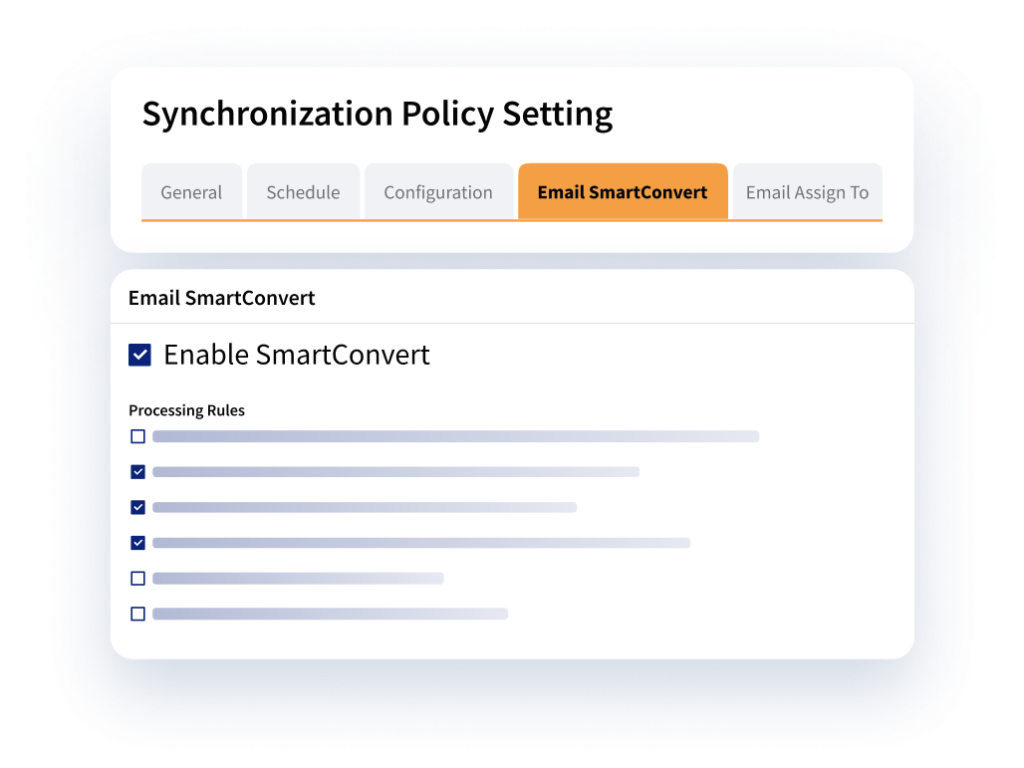
That includes things like subject-line or keyword rules, domain exclusions, token-based filtering, and different policies for different groups. This kind of control is especially useful when “sync everything for everyone” isn’t realistic.
2. Real-Time Calendar Sync at Scale
Riva supports bi-directional calendar syncing in real time and is built to handle enterprise volume reliably. Riva publishes deployments supporting 5,000+ simultaneous users.
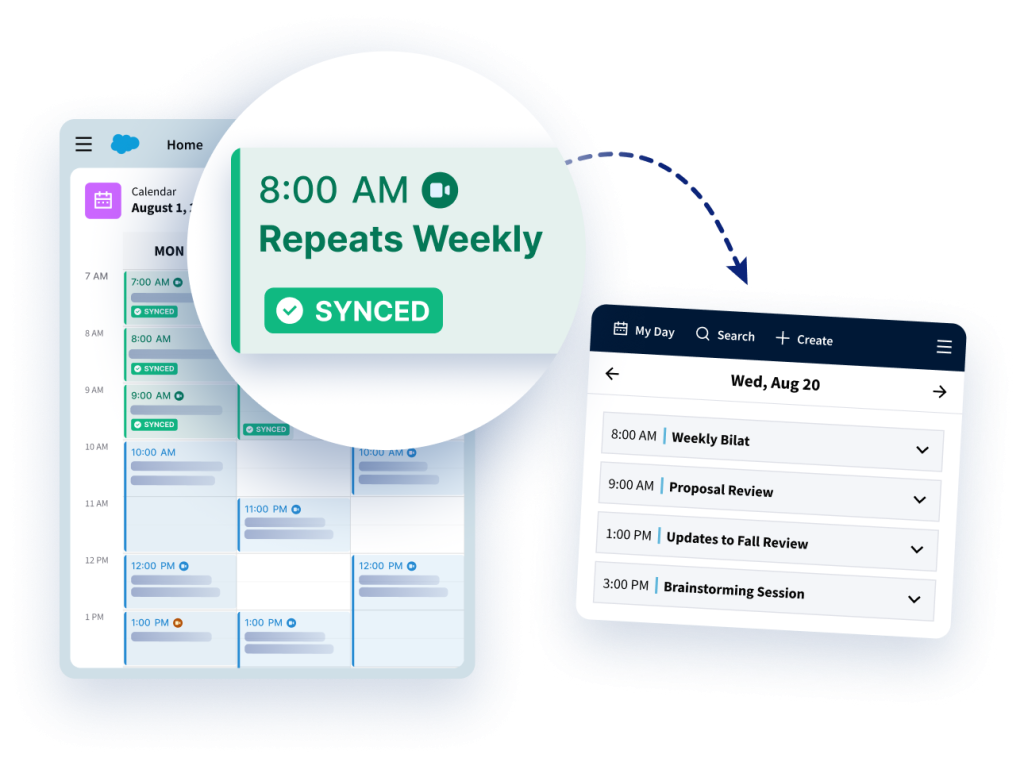
For teams that rely on recurring meetings, shared scheduling, or assistant-driven workflows, Riva also supports delegated calendars and built-in Outlook invite behavior.
3. Security and Compliance Built for Regulated Teams
Riva uses a pass-through architecture and provides granular privacy controls designed for regulated data environments, including support for policies that protect sensitive information such as MNPI. Riva is SOC 2 certified, reflecting long-running security governance practices.

4. A More Useful Outlook Side Panel
Most client-facing work happens in Outlook. Riva Insight brings CRM context into that workflow so users can stay in their inbox while still working with Salesforce records.
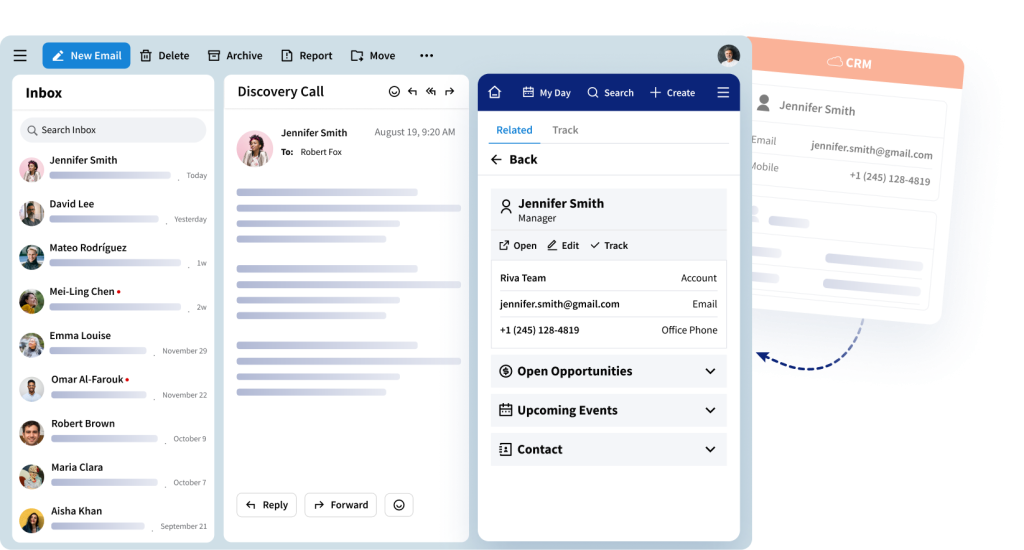
With features like My Day, users can see upcoming meetings, track what’s been captured, and handle prep or follow-ups without bouncing between systems.
5. Integrated Scheduling and Sales Engagement
Riva can also support advanced sales engagement inside Outlook, including shared email templates, multi-step cadences, and scheduling links that reflect real availability.
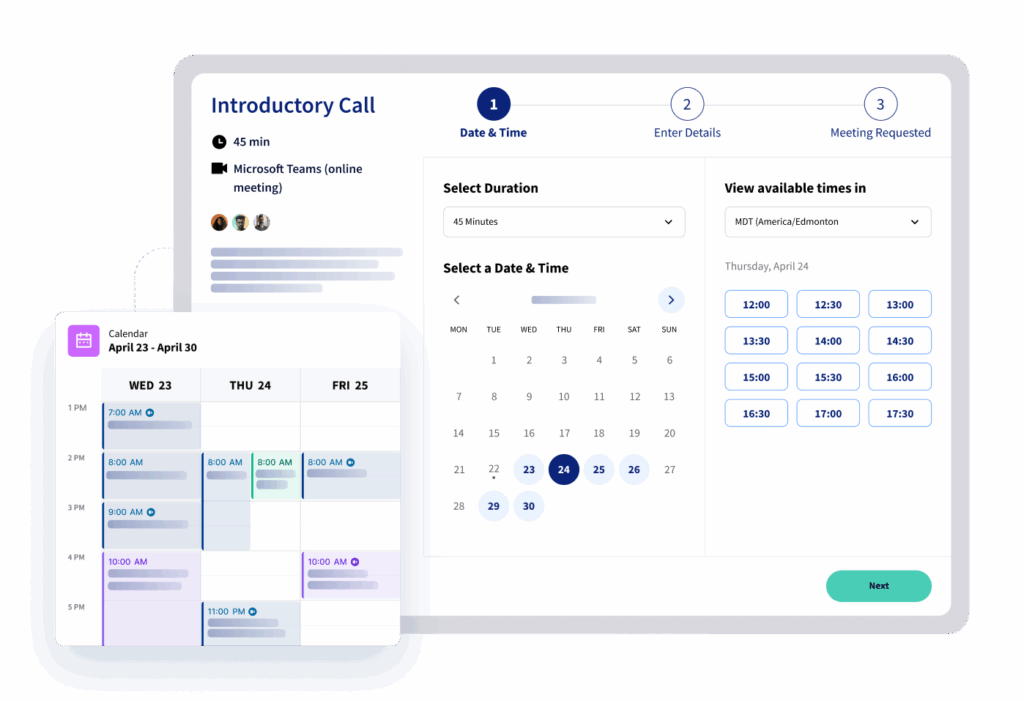
That means teams can capture interactions, act on them, and follow through — all from the inbox — without stitching together separate tools later.
See How a Hedge Fund Strengthened Its Salesforce–Outlook Integration
In this success story, a Boston-based hedge fund shares how they improved data quality, reduced advisor friction, and gained reliable activity visibility by replacing EAC with Riva.
Read More
What to Look for in an Enterprise-Grade Salesforce–Outlook Integration
Whether you use Einstein Activity Capture or another solution, the outcome you’re aiming for is the same: reliable activity in Salesforce without burdening your teams. When that’s working well, organizations typically see:
Enhanced Productivity and Easier Collaboration
When emails and meetings are captured automatically, teams spend less time on admin and more time on clients. It also makes collaboration simpler, since everyone can see the same interaction history without chasing updates across systems.
A More Accurate View of Client Relationships
Syncing emails, contacts, and calendar events keeps Salesforce timelines current. That gives leaders a stronger foundation for reporting and forecasting, and gives client-facing teams better context for every conversation.
Time and Budget Saved
Automation reduces manual effort and avoids data cleanup later. In Forrester’s Total Economic Impact™ (TEI) report on Riva, large enterprises reported meaningful time savings and operational efficiency gains after implementation.
Better Insights and Automation
When activity is captured consistently, your Salesforce reports and dashboards have better data to work with. That leads to deeper insights, more reliable KPIs, and workflow automations that behave the way they’re supposed to.
Higher ROI From Your Salesforce Investment
Finally, when Salesforce reflects real client activity, it graduates from being a database to a key system that teams use every day. That’s when organizations start to see a stronger return on their Salesforce investment overall.
Conclusion: Choosing the Right Activity Capture Approach
Salesforce Einstein Activity Capture can be a reasonable fit for organizations with simple, standardized workflows. But as soon as teams need granular control over contact creation, email filtering, calendar behavior, record matching, or compliance boundaries, EAC’s built-in limits can start to show, and your organization might need to look for an alternative to Einstein Activity Capture.
Riva is built for those more demanding environments. It gives regulated teams the configurability, precision, and security controls they need, while still letting users work naturally in Outlook. Ultimately, this means more impactful AI tools, improved decision-making, and reduced advisor friction.
If you want to see how Riva would map to your specific Salesforce and email setup, book a demo with our team.
*Trademarks, product and trade names, logos, images, and brands that appear on our website are the property of their respective owners and are used for identification purposes only. Their use does not imply or suggest affiliation, sponsorship, endorsement, partnership, or approval by their respective owner.
Frequently Asked Questions
What is Einstein Activity Capture in Salesforce?
What is Einstein Activity Capture in Salesforce?
Einstein Activity Capture (EAC) is a Salesforce-Outlook integration that helps keep data between Salesforce and your email and calendar applications (Outlook and Gmail) up to date, reducing the need for manual logging. It focuses on three types of data: emails, events, and contacts.
What data does Einstein Activity Capture sync with Salesforce?
What data does Einstein Activity Capture sync with Salesforce?
Einstein Activity Capture works with emails, events (meetings), and contacts but with limited functionality. Emails get synced as tasks if Enhanced Email is disabled; as of summer 2025, upon enabling Enhanced Email, emails sync as native Salesforce records.
But there is a trade-off. EAC’s contact sync only works with contacts that exist in the email client and does not interact with incoming and outgoing email traffic.
Moreover, EAC does not sync tasks such as to-do lists in Outlook or Gmail, and it does not support custom objects.
Is Einstein Activity Capture two-way or one-way sync?
Is Einstein Activity Capture two-way or one-way sync?
Einstein Activity Capture syncs contacts and calendar events both ways, but emails are captured only one-way into Salesforce.
For regulated industries, this matters because emails cannot be fully audited, modified, or controlled through the sync, limiting compliance and oversight.
Where is Einstein Activity Capture data stored?
Where is Einstein Activity Capture data stored?
Einstein Activity Capture stores most data in a Salesforce-managed external data store (AWS/Hyperforce), though the summer 2025 update allows new emails to sync as native Salesforce records if enabled. Historical captured data and some metadata still remain outside core CRM objects.
Because this external-storage model may raise compliance, residency, or audit concerns, regulated industries should review governance requirements before enabling EAC.
Is Einstein Activity Capture compliant for regulated industries?
Is Einstein Activity Capture compliant for regulated industries?
Einstein Activity Capture is cloud-only and works with Gmail or Office 365, but not on-premise Outlook. It provides basic enable/disable and domain-blocking options but lacks granular sync controls or detailed audit trails.
Because of these limitations, it may not meet strict regulatory requirements or support sensitive-data scenarios, making it less suitable for highly regulated industries.
What are reliable alternatives to Einstein Activity Capture in Salesforce that give more control over data?
What are reliable alternatives to Einstein Activity Capture in Salesforce that give more control over data?
Reliable alternatives to Einstein Activity Capture include dedicated Salesforce activity capture platforms, such as Riva, that sit alongside Salesforce’s built-in tool and offer tighter control over what’s synced, how it’s stored, and who can see it.
These enterprise-grade options typically provide:
- Policy-based filtering
- Stronger governance and privacy controls for sensitive data
- Better quality data for reporting, supervision, and AI use cases
Riva is designed for organizations that need more control over capture, especially regulated industries, while still letting users work naturally in Outlook or Gmail.
When should an enterprise consider alternatives to Einstein Activity Capture?
When should an enterprise consider alternatives to Einstein Activity Capture?
The following are some factors to consider when deciding if Einstein Activity Capture is the right tool for you:
- Do you have a highly customized Salesforce environment?
- Do you require client interactions to sync into custom objects?
- Does your business have a complex sales and client engagement process?
- Do you require deep control over sync policies for different users and different clients?
- Are you planning on scaling your business?
If you’ve answered yes for most or all of these, you should look for a specialized activity capture solution instead of EAC.
Can I control which emails Einstein Activity Capture syncs?
Can I control which emails Einstein Activity Capture syncs?
Only at a broad level. Einstein Activity Capture doesn’t support advanced filtering such as keyword rules, subject-line rules, folder-based exclusions, or role-based policies. Many regulated or distributed teams find these controls too limited for their governance needs.
Does Einstein Activity Capture automatically log all emails and meetings?
Does Einstein Activity Capture automatically log all emails and meetings?
No. Einstein Activity Capture automatically captures most emails and calendar events but with limits. It can miss activity when matching rules don’t find a related record, when governance rules block the sync, or when calendar scenarios are too complex.
Does Einstein Activity Capture store emails inside Salesforce?
Does Einstein Activity Capture store emails inside Salesforce?
With recent updates, Einstein Activity Capture can store full emails as Salesforce records, but admins must choose between storing full emails (with more context and more storage overhead) or storing minimal metadata. This trade-off impacts reporting and governance.
What happens if my Salesforce environment is highly customized?
What happens if my Salesforce environment is highly customized?
Einstein Activity Capture works best in standardized Salesforce environments. Custom objects, complex routing rules, or specialized reporting often require precision that EAC doesn’t provide, resulting in missed activity data in the CRM.
Does Einstein Activity Capture support calendar sync?
Does Einstein Activity Capture support calendar sync?
Yes, with limitations. For single meetings, it works well. But sync starts to fail for recurring meetings. Any modifications made to individual meetings in that series result in duplicates or missed syncs, creating messy CRM data.