

This article explains the Exchange Online EWS retirement timeline, how the change affects Dynamics CRM server-side synchronization, the resulting business impact, and the options for maintaining sync between Exchange Online and Dynamics CRM on-premises.
Many organizations intentionally run Dynamics 365 Customer Engagement (on-premises) while using Exchange Online through Microsoft 365 for email and calendars. Microsoft provides a built-in connection that synchronizes emails, appointments, contacts, and tasks between the two systems.
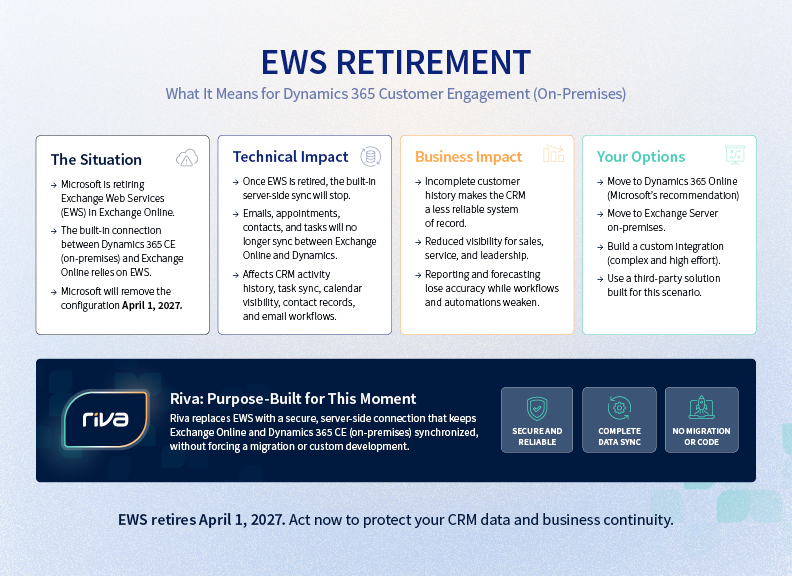
Microsoft is retiring Exchange Web Services (EWS) in Exchange Online. Microsoft EWS is the API that the built-in Dynamics connection relies on, and Microsoft has stated that support for this configuration ends on April 1, 2027.
For Dynamics CRM on-premises organizations, this is not a routine infrastructure update. It can disrupt the client activity data that teams rely on to manage relationships, understand pipeline health, and maintain a complete customer record.
The retirement creates a real gap for organizations that need to keep Dynamics on-premises while using Exchange Online for email. Microsoft recommends moving to Dynamics 365 online or using Exchange Server on-premises, but neither is a simple replacement for the architecture many teams have chosen.
One practical question for teams now remains: How do we preserve reliable client activity sync without turning an email integration change into a CRM migration or custom development project?
Key Takeaways
- Microsoft begins blocking EWS in Exchange Online on October 1, 2026. EWS will be permanently disabled on April 1, 2027.
- When the built-in Dynamics connection can no longer use EWS, emails, appointments, contacts, and tasks can stop syncing between Exchange Online and Dynamics CRM on-premises.
- The impact extends beyond CRM and IT: incomplete activity data can reduce sales trust in CRM, limit management visibility, weaken forecasts, and create gaps in customer and compliance records.
- Organizations can migrate to Dynamics 365 online, move email back to Exchange Server on-premises, build a custom Graph connector, or use a Graph-based sync layer.
- A transition plan now gives teams time to protect continuity without forcing a broader CRM decision on Microsoft’s timeline.
The Timeline for the Exchange Online EWS Retirement
Microsoft is using a phased approach to the EWS deprecation in Exchange Online. The following dates matter for Dynamics CRM on-premises organizations:
| Date | What It Means |
| May 25, 2026 | Support ended for Dynamics CRM Customer Engagement v8.0 (on-premises) with Exchange Online. |
| October 1, 2026 | EWS blocking begins for Exchange Online tenants that have not taken action to keep EWS temporarily available. Microsoft identifies this as the deadline to move to Dynamics 365 online or allow-list EWS until April 1, 2027. |
| April 1, 2027 | EWS is permanently disabled in Exchange Online. Support for Dynamics CRM Customer Engagement v9.0 (on-premises) with Exchange Online ends. |
Microsoft’s EWS phase-out dates are especially significant for organizations that rely on the built-in Dynamics connection. The October date is an important checkpoint, but it is not a long-term extension. Microsoft has made clear that EWS will be permanently unavailable in Exchange Online on April 1, 2027.
What Does Retirement Means for Dynamics CRM Server-Side Sync?
For affected organizations, the concern is built-in server-side synchronization. Microsoft’s on-premises documentation confirms that the Exchange Online connection uses EWS. Server-side synchronization keeps email, appointments, contacts, and tasks aligned between Dynamics and Exchange.
Once EWS is permanently retired, the connection cannot exchange this data with Exchange Online, which can affect CRM activity history, calendar visibility, contact records, task synchronization, and email-driven workflows.
If your organization uses the Dynamics 365 App for Outlook alongside server-side synchronization, include that workflow in your impact assessment as well. The question is not simply whether users can access Outlook but whether the client context they create in Outlook will continue to reach Dynamics reliably.
The Business Impact Goes Beyond CRM and IT
When client interactions stop reaching Dynamics reliably, the downstream impact can be felt across the business:
- Salespeople lose confidence that CRM reflects their latest client conversations, meetings, and follow-up activity.
- Managers lose visibility into activity levels and the relationship context behind opportunities.
- Forecasts become less reliable when the activity data used to assess deal health is incomplete.
- Customer history becomes fragmented, making it harder for teams to prepare for client conversations or hand off accounts.
- Compliance and record-keeping processes can become inconsistent when activity capture depends on manual workarounds.
The technical change may begin with an integration, but the risk is incomplete customer context across the teams that depend on Dynamics.
Why Is Microsoft Retiring EWS?
Microsoft began limiting new EWS functionality in 2018 and later announced its retirement in Exchange Online. Its direction is Microsoft Graph, a modern API surface for Exchange Online workloads. Microsoft has also said that the January 2024 Midnight Blizzard incident increased the urgency of the transition.
The technical rationale is understandable. The operational challenge is more immediate. Microsoft’s built in Dynamics 365 on-premises Exchange Online integration has a defined end date. It does not have a like-for-like Microsoft Graph replacement for the on-premises product.
Microsoft’s direction is clear: move Exchange Online workloads to Microsoft Graph. For Dynamics CRM on-premises teams, the challenge is that the built-in connection does not have a like-for-like Graph replacement.
Four Ways to Maintain Dynamics CRM and Exchange Online Sync
- Migrate Dynamics CRM On-Premises to Dynamics 365 Online
Moving to Dynamics 365 online follows Microsoft’s recommended direction and removes this specific Exchange Online dependency. For some organizations, it is the right strategic move, but a CRM migration has its own timeline, governance, budget, integrations, and change-management requirements. It should be a deliberate business decision, not a response to an email synchronization deadline.
- Move Email Back to Exchange Server On-Premises
The EWS retirement applies to Exchange Online, not Exchange Server on-premises. Keeping email on-premises can preserve the built-in connection, but it reverses a cloud-mail decision and introduces a much larger infrastructure question. It is rarely a simple workaround.
- Build a Custom Microsoft Graph Connector
Building a custom connector can keep Dynamics and Exchange Online connected through Microsoft Graph. It also creates a development and support commitment. Teams must manage authentication, field mapping, error handling, logging, monitoring, product changes, and testing. The work does not end when the first integration goes live.
- Use a Graph-Based Sync Layer
A dedicated sync layer lets organizations keep the CRM and email architecture they have chosen while replacing the dependency that is being retired. This is where Riva fits.
Riva Dynamics CRM Integration Is Built for the Graph Transition
Riva is not a CRM replacement. It is a dedicated integration layer that connects Exchange Online and Dynamics CRM through Microsoft Graph. It is built for organizations that need to preserve the governance, data ownership, and predictable integration behavior that led them to keep Dynamics on-premises.
New Riva deployments that connect to Exchange Online use Microsoft Graph from day one. Riva delivers full platform capabilities through Graph.
Riva helps organizations:
- Synchronize email, calendar activity, contacts, tasks, email tracking, and custom objects between Exchange Online and Dynamics CRM.
- Configure granular policies that determine what data syncs, where it is written in CRM, and how it is governed.
- Use Dynamics security roles to help control what users can capture and access.
- Recover missed activity and rebuild a more complete CRM record if a built-in sync interruption has already created a gap.
For more than 15 years, Riva has delivered secure, scalable CRM connections for some of the largest and most regulated enterprises. Riva handles encryption, permissions, and secure data transfer, and acts as a pass-through for synchronized customer data rather than storing the content it moves between systems.
For organizations evaluating an alternative, the value is not simply that Riva uses Graph. Riva gives enterprise teams a way to maintain Exchange Online and Dynamics CRM sync with the control, reliability, security, and CRM context they need, while keeping their longer-term migration strategy on their own timeline.
Keep Outlook and Dynamics in Sync With Less Manual Work
Explore our overview to see how configurable, governed sync with Riva can reduce manual work and help maintain complete CRM activity history.
Choose a Path Without Triggering a Larger Transformation
The EWS retirement puts Dynamics CRM on-premises organizations in a difficult position. They can accept a disruption to client activity sync, undertake a broader platform change, or build and maintain an integration themselves.
There is another option. A dedicated Graph-based sync layer lets you protect continuity now while keeping your longer-term CRM strategy on your own timeline. You can continue to use Exchange Online, keep Dynamics on-premises, and preserve the connected client context your teams rely on.
Your Dynamics and Exchange Online Strategy Needs a Plan
If you use Dynamics CRM on-premises with Exchange Online, now is the time to assess your EWS dependency and plan for the transition. Riva can help you identify the workflows at risk, connect Exchange Online and Dynamics through Microsoft Graph, and protect or recover CRM activity history without forcing an immediate platform migration.
Talk to Riva today to learn how we can help.
Questions? We Have Answers
What Is EWS?
What Is EWS?
Exchange Web Services (EWS) is a Microsoft API that applications use to access Exchange mailbox data, including email, calendar items, contacts, and tasks. Microsoft is retiring EWS in Exchange Online and directing organizations toward Microsoft Graph.
When Will Microsoft Disable EWS in Exchange Online?
When Will Microsoft Disable EWS in Exchange Online?
Microsoft begins phased EWS disablement on October 1, 2026. EWS will be fully and permanently disabled in Exchange Online on April 1, 2027.
Does the EWS Retirement Affect Exchange Server EWS?
Does the EWS Retirement Affect Exchange Server EWS?
No. Microsoft’s retirement applies to EWS in Exchange Online. Exchange Server EWS remains supported on-premises. Moving email back on-premises may be an option, but it is a broader infrastructure decision.
How to Keep Dynamics CRM On-Premises After EWS Retirement?
How to Keep Dynamics CRM On-Premises After EWS Retirement?
Microsoft recommends moving to Dynamics 365 online or using Exchange Server on-premises. If your organization needs to keep Dynamics CRM on-premises and Exchange Online, a Microsoft Graph-based sync layer provides a third path that does not require an immediate CRM or email-platform migration.
Does Riva Still Use EWS for New Exchange Online Deployments?
Does Riva Still Use EWS for New Exchange Online Deployments?
No. New Riva deployments that connect to Exchange Online use Microsoft Graph. Riva provides the full platform capabilities required for the connection through Graph. Existing Riva customers with legacy EWS connections should work with Riva on their migration plan.
What Should We Do Before October 1, 2026?
What Should We Do Before October 1, 2026?
Identify the Dynamics workflows that rely on server-side synchronization, confirm whether your Exchange Online tenant has EWS dependencies, and establish a plan for the permanent April 2027 shutdown. Temporary EWS allow-listing can buy time, but it is not a long-term solution.